
Floorboard Early access
The front of house, all on one board.
Floorboard is live for early partners: performance rankings, the Daily Log Book, forecasting and scheduling, team messaging, HR forms, and reporting. Managers open Paths and Mise & Mastery from Floorboard without signing in again. Paths is its own app for food safety.
Shift to Shift
Just need Floorboard? Built to connect to your POS.
Explore a live sample restaurant. No login, nothing to install. Your copy resets when you're done.
All Table & Line products have live demos: Floorboard(opens in a new tab), Mise & Mastery(opens in a new tab), Paths(opens in a new tab), Rail & Pass(opens in a new tab), Into the Logo Recruiting(opens in a new tab) and Ticket & Tab(opens in a new tab).
Performance & rankings
Recognize your best shifts, not just your busiest ones.
Every team member gets a score from daily sales, guest reviews and manager feedback. Rates are normalized so a strong slow night compares fairly with a strong rush, and roles include Server, Bartender, Coach Server and Coach Bartender.
Daily sales
Per-shift sales that credit thoughtful selling, not just volume.
Guest reviews
What guests say about their experience, tied to who took care of them.
Manager feedback
The things numbers miss: teamwork, side work and composure under pressure.
Your weights
Whole-number sliders that always total 100%. Training completion can be a weight too (0% by default).
The Performance page, sales history and accountability keep the team focused on what moved the score every day and every week.
- 192Coach Server
- 290Bartender
- 387Server
- 485Server
Daily Log Book
RedesignedThe whole restaurant's day, on one page.
The redesigned Daily Log Book brings every shift together, so each manager walks in knowing what happened and what still needs doing.
- Shift-note tiles that turn green when they're saved
- Manager initials on every note they've read
- Safe counts, plus the day's sales and labor
- Crew review and an Accountability & Feedback tile
Forecasting & scheduling
Forecast the week, then fill the board.
Guest and sales forecasts suggest AM and PM staffing numbers that autofill the schedule. Build the week from performance ranking, from scratch, or from reusable templates, then fine-tune it in Week view or the new Coverage view. Drag and drop works in both (press and hold on a phone), and every job code has its own color.
Forecast
Suggested AM/PM headcount based on guests and sales, ready to drop into the week grid.
Week view
Auto-generate from rankings, start blank, or reuse templates. Availability and coach flags with a coaching bonus stay on the board.
Coverage view
A single-day, 24-hour grid with editable shift bars, unscheduled staff alongside, and per-position charts of scheduled vs. forecast and actual covers.
Requests & approvals
Time off, request to work, shift drop, pickup and swaps — reviewed in one place.
Team communication · Labor & productivity
Keep the team in the loop, and the labor plan honest.
Also in Floorboard: the built-in AI assistant, a Recipe Book, Invoices/AP and P&L, and a one-tap hop over to Rail & Pass.
Team messaging & alerts
- Team messaging for the people on the floor
- Group messages for a whole team or crew at once
- Push alerts when the schedule changes
- Per-alert opt-in for employees and managers
Productivity & labor
- Operating hours that match how you actually open and close
- Staffing rules tuned to each daypart
- Custom job codes with a tipped flag. Default wages with state wage guidance, customizable for county and city rules
- Job codes sync to your Into the Logo Recruiting hiring site
Sign-in & devices
- Passkey sign-in
- Company tablet and device security
- Mobile-friendly everywhere, with pinch zoom
About wages and labor rules. Default wages come with state wage guidance. Laws change often in some areas, so check with your legal team. Some counties and cities have their own labor laws, and you can customize for them. Labor compliance is ultimately management's responsibility, and we'll make every effort to make it easier.
Built-in AI assistant
Less time in the office, more time on the floor.
The assistant lives right in Floorboard, on your phone or tablet. Watch Michael walk through it in video 2. Built-in AI assistant on a paid business AI plan, for managers. Customer content isn't used to train AI models.
Notes by voice or typing
Tap the mic and talk, or type. It drafts the note and shows who, what day and what you said. Give feedback to several employees in one request, and mark multiple items at once. Nothing is saved until you tap Save, and only managers (18+) get AI.
AI document reader
Upload a photo or PDF, like a sales printout or contest tally. It lines up the rows, and you check them before you confirm.
Invoice scan
Snap a vendor invoice, check the vendor and line items, and send it to the general manager for approval. AI invoice scanning reads your invoices for you, with a clear one-time notice a manager agrees to before anything is sent.
The assistant as a chat
Coming soonMessage bubbles, a progress update while it works, long multi-line feedback and voice dictation, follow-up questions like “Which Ben?”, and a confirmation card showing exactly what was saved.
Training
Available to activateGame-based staff training, from your own manual.
Upload a training manual (Word, PDF or PowerPoint, up to 25 MB) and it builds levels and quizzes sized to the content, with the final exam taken from the manual's own final-exam questions. A manager submits a game, and a GM or admin approves it before staff play. Checkout is on the web.
Training is part of Mise & Mastery, and the Mise & Mastery tile in Floorboard opens it. Training videos end with a slide review, so owners can review the slides before they approve. See how it works, or Activate Mise & Mastery.
Take a quiz, play flashcards, and see the leaderboard, reports and certificates. AI quiz writing isn't part of the demo; ask us for a walkthrough.
Your sources, AI-written packs
- Upload a training manual, up to 25 MB
- Levels and quizzes sized to the content
- A GM or admin approves the game before staff play
Assign & track
- Assign to individuals or by position, with due dates
- Completion reports: complete, pending and late
- Certificates of completion
Play & rankings
- A leaderboard and progress for every employee
- Optional training-completion weight in the rankings (0% by default)
Accountability
Coaching and write-ups that stay attached to the person.
Documented coaching and write-ups feed into rankings, with print-ready forms when you need a paper trail, and the Daily Log Book has its own Accountability & Feedback tile. Coach Server and Coach Bartender roles carry a coaching bonus on the schedule.
HR forms
Onboarding paperwork without the binder.
W-4, I-9, handbook, tip credit, uniform and certification forms with finger-draw e-signatures, started from the Onboard new employee page under Team. Sensitive fields like SSN stay encrypted and masked.
Paths
Paths walks, temperature logs and monthly safety meetings.
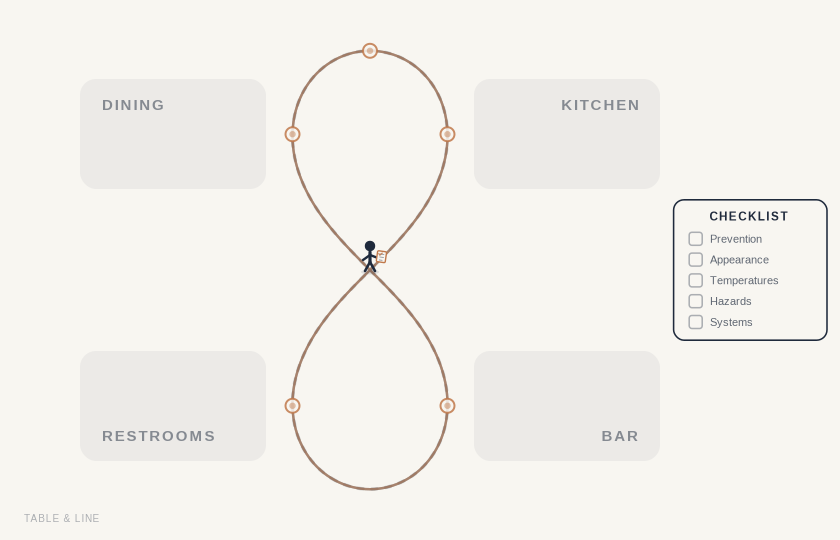
Paths is its own product. A restaurant can use it without Floorboard, and the walks also run alongside Floorboard. Checklists follow the building room by room, in the order you walk it, plus temperature logs that auto-fail out of range and repair tasks that stay visible until they're done. Explore Paths.
PATHS facilities
Follows the current FDA Food Code. Walks follow the code your state has adopted. New Food Code items (2-inch cooling, an approved cooling alternative, disinfectants, food defense, double gloving) turn on automatically when your state adopts them. A written employee illness policy shows as best practice everywhere.
Monthly Safety Meeting
A 12-month safety topic calendar, printable posters, attendance tracking, sign-off, action items and safety-concern photos.
Nationwide
Built for restaurants in every state.
Floorboard is built for restaurants nationwide: all 50 states plus DC. Paths follows the current FDA Food Code and the code your state has adopted, and the federal tip rules are built in. Wage, tipped, sick leave and break rules for all 50 states plus DC are built in, and Floorboard exports hours by job code, tips and tip-outs each pay period for your payroll provider. New hires show as “Not yet ranked” until they have enough shifts. The UI is mobile-first.
Owners and operators
- Group View: connect your stores and see them in one place
- Food-safety rules that follow each restaurant's state
- HR and food safety in the same place as the schedule
General and FOH managers
- Forecasts that seed the week grid
- Requests and coaching without a spreadsheet
- Store walks and safety meetings that get signed off
- AI invoice scanning is shown in the demo, after a manager agrees to a one-time notice
Servers and bartenders
- A score you can understand and influence
- Schedule changes and alerts on your phone
- A path to Coach Server or Coach Bartender
Built with you
Software that keeps improving after you sign on.
Floorboard is built by a restaurant manager, for restaurant managers, and it grows with the people using it. If something would make your shifts easier, tell us.
Optimized and updated
Products are being optimized and updated.
By a restaurant manager, for restaurant managers
It started on the floor, with the problems that show up on a real shift, not in a boardroom.
Special requests welcome
Need a report, a form or a workflow you don't see here? Send it in. Every request is read, considered, and designed as quick as we can.
Personalized to your restaurant
We'll tailor the experience as much as your restaurant needs, as far as we're able.
Founding Restaurants program
To become a Founding Restaurant, take the whole four-product bundle (Floorboard, Mise & Mastery, Paths, and Rail & Pass) at $150 per location per month, or the yearly deal (prepay 12 months for the price of 11 at that same $150 rate). Ticket & Tab stays outside this bundle.
Open to independent restaurants and restaurant groups anywhere in the US (all 50 states + DC), whatever POS you use today. A restaurant group counts as one founder.
The first 10 restaurants that check out the full four-product bundle at $150 per location per month, or the yearly deal (12 months for the price of 11 at that rate), become Founding Restaurants automatically. Taking the bundle fills a founder spot until 10 are taken. A restaurant group counts as one founder. You do not request early access or wait to be invited.
Any account added through a Founding Restaurant account gets the same founder pricing and the same founder deal: the $150 bundle (or the yearly deal), the price lock of up to 3 years you choose, and the 25% processing-income bill credit toward the $79 Ticket & Tab subscription, capped at $79. That does not use another of the 10 founder spots. A restaurant group counts as one founder.
Plans, bundle savings and the one-time setup are on our pricing page.
See pricingFounders get
- Price-lock term of up to 3 years, chosen by you, on the $150 bundle rate (or the yearly deal) you sign up at
- Founders pay the Ticket & Tab subscription: $79 per location per month (never the install).
- Founders get a bill credit of 25% of Table & Line's processing income from that restaurant's card volume, applied toward that $79 bill and capped at the full $79. If the credit is smaller than $79, they pay the remainder. Credits are never paid out as cash and cannot take the bill below $0.
- Into the Logo Recruiting, by Table & Line: your own branded hiring and onboarding site, included at no extra charge
- “Included” means our software, updates and support, not hardware. Restaurants buy their own iPads.
- Each location has its own start and end date
- First access to Ticket & Tab by Table & Line, our POS: pilot it in your restaurant and help shape it See what's coming →
- Access while products are still being optimized and updated, with new features first
- Full refund within 60 days of go-live. After that, no refunds and no partial months.
- Lifetime concierge: a direct line to Michael to help shape what's next. Founders work directly with him. No sales reps, ever
We ask for
- Regular feedback and testing of new features
- Honest input on what we build next
Details in the founder agreement.
Questions about the founder agreement? Contact us.
Want Floorboard on your floor?
Already invited? Log in to the app. Otherwise, request early access and we'll be in touch.
Where Floorboard stands
What's live, and what's next.
Live now
- Built-in AI assistant on a paid business AI plan, for managers
- Group View: owners and district operators with several locations can connect their stores to Floorboard and see them in one place
- Fairer performance rankings on a rolling 12-month view; new team members stay unranked until every field has data and they've been on the roster for 8 weeks
- Labor compliance for all 50 states plus DC, on a national baseline
- Payroll export as a CSV file
- Safer shift handoffs
- Scheduler: weekly drag-and-drop, a single-day coverage view with charts by position, and a color for each job code
- Custom job codes with tipped flags, and default wages that never go below the legal minimum
- POS auto-linking: new hires link to their register profiles automatically, with no IDs to type
- Digital Log Book and Daily Log Book
- Reporting: sales, labor and related reports
- Managers open Paths and Mise & Mastery from Floorboard without signing in again
- Recipe Book with video links
- Invoices and P&L
- Updated Training: upload your material to build a module and quiz, and a manager approves it
- Hiring pipeline connected to Into the Logo Recruiting
- Device security: company tablets and Admin-controlled phone access
In development and coming next
- More Group View features
- Closer links between Floorboard and Ticket & Tab: clock-in windows, food, alcohol and retail sales breakdowns, and punch corrections
- Coming next: self-branding. Upload your logo, colors are pulled automatically, with a live preview
- Coming next: menu-item sales contests